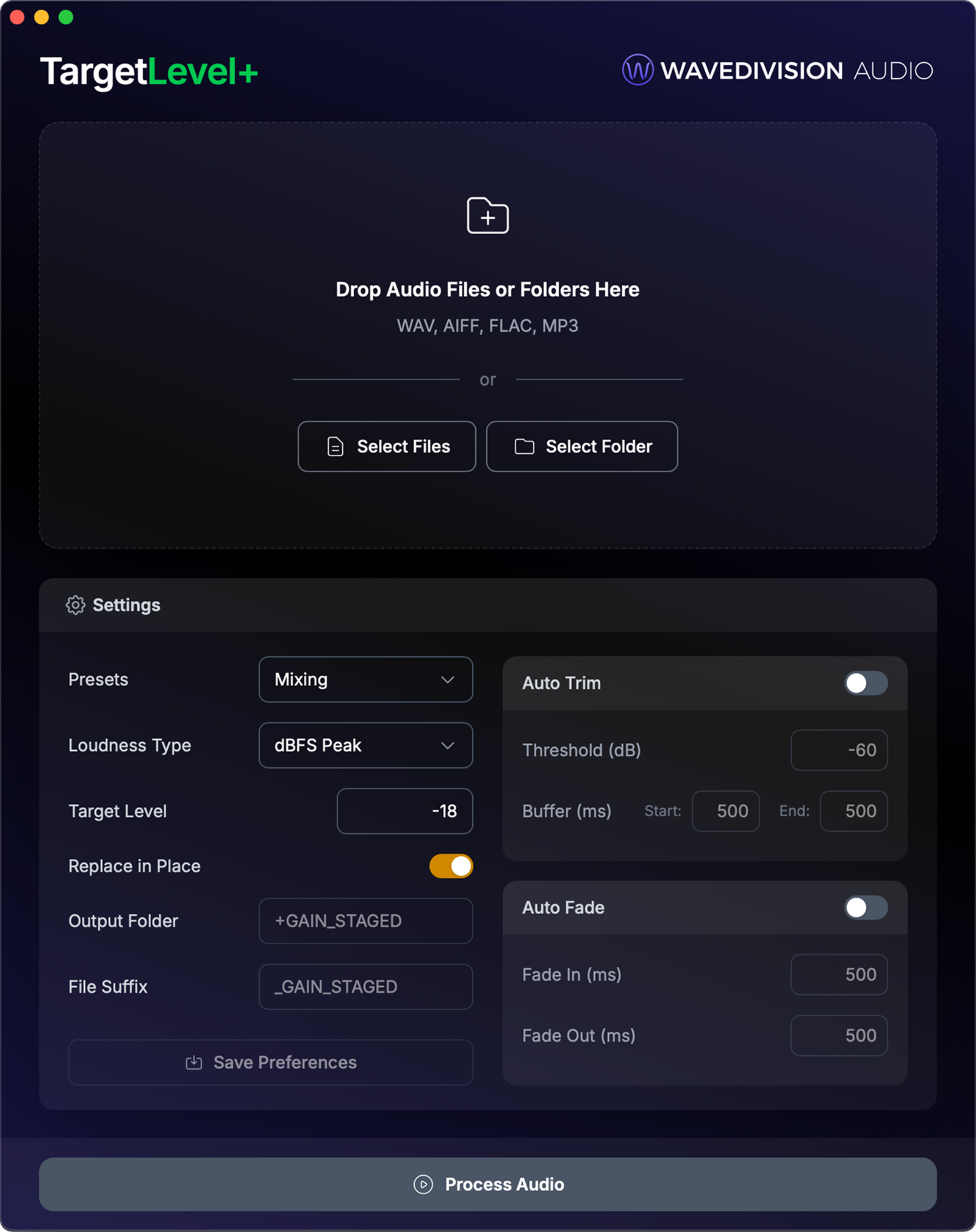
How It Works
Three steps. Zero tedium.
Import session or drop files
Import a supported DAW session file to load all associated audio automatically, or drag in files/folders manually. TargetLevel+ handles WAV, AIFF, FLAC, and MP3.
Pick your preset
Choose from built-in workflow presets tailored to mixing, mastering, broadcast, podcasting, and more. Or dial in a custom target. Each preset sets the right loudness type and level so you can skip the guesswork.
Hit process
Your files are gain staged, trimmed, and faded in seconds. Processed files land in an organized output folder, ready to drop back into your DAW.
The Right Level for the Job
Every workflow has an ideal target. We built presets for each one.
Most DAWs normalize to peak level. They adjust gain so the loudest sample hits a target, usually 0 dBFS. Two tracks can both peak at the same level but have completely different perceived loudness depending on their dynamic range and frequency content. TargetLevel+ measures each track individually using dBFS Peak, LUFS, or RMS and adjusts each one to your exact target, giving you a consistent, calibrated starting point across your entire session.
Different workflows call for different loudness targets. Mix engineers often calibrate to -18 dBFS (0 VU per SMPTE) so analog-modeled plugins operate at their intended level. Mastering engineers may need a consistent RMS level across the mixes before mastering an album. Podcast editors typically aim for -14 to -16 LUFS to meet Apple Podcasts and Spotify specs. Broadcast work demands EBU R128 or ATSC A/85 compliance.
TargetLevel+ ships with workflow presets that set the right loudness type and target for each discipline, so you don't have to memorize specs. Pick a preset, or dial in your own custom target from -70 to 0 dB across five measurement types.
Core Features
Levels matched. Edits smoothed. Silence trimmed.
Precision Gain Staging
Start every mix from a clean, calibrated baseline
Select a workflow preset for mixing, mastering, broadcast, or podcast and TargetLevel+ sets the optimal loudness target and measurement type for you. It measures using broadcast-standard algorithms (dBFS Peak, LUFS, or RMS) and applies the exact gain needed, with automatic clipping prevention.
Auto Fade
Smooth fades, zero effort
Apply independent fade-ins and fade-outs with millisecond precision across your entire session. No more manually drawing fades on every single track. Set it once and let TargetLevel+ handle the rest.
Auto Trim
Kill the dead air
Intelligent silence detection removes unwanted dead space at the start and end of your files. Set your own threshold (-120 to 0 dB) and add custom buffers so you keep exactly what you want.
Batch Processing
Entire sessions in seconds
Drop a folder and process every file at once. Subfolder structure is preserved, so your organized project stays organized. Process an entire album while you grab coffee.
Built for Reliability
Your files are safe. Always.
Replace in Place with Auto-Backup
Overwrite your original files with processed versions. TargetLevel+ automatically creates a backup folder first and restores originals if anything goes wrong.
Clipping Prevention
If applying gain would push peaks above 0 dB, TargetLevel+ automatically reduces gain to prevent clipping. You get headroom warnings, never distortion.
File Verification
Every processed file is verified after writing. If a file fails verification, you get a clear error, never a silently corrupted output.
Crash-Safe Processing
Temp files are cleaned up even if the app crashes. Lock detection prevents overwriting files that are open in your DAW.
Built For
Your workflow. Your rules.
TargetLevel+ ships with workflow presets tailored to how you actually work. Pick yours and start processing immediately.
Music Producers
Gain stage stems and bounces before mixing so every plugin hits its sweet spot from the start.
Mix Engineers
Start every session from a calibrated baseline. No more riding faders to compensate for wildly different track levels.
Mastering Engineers
Gain stage client files to a consistent level before processing. Batch an entire album in seconds.
Works with every major DAW
TargetLevel+ processes files outside the DAW so your session stays light. Import a session file or drop files manually, then send everything back gain staged. No plugins to install, no routing to configure.
What Professionals Are Saying
Built for the people who
know the pain.
“This is a game changer because instead of spending a lot of time prepping the tracks, you can use that time to mix.”
Hazael S.
Producer
“Saves me so much time and peace of mind when leveling for mastering sessions. I get predictable results downstream in my signal chain every time.”
Anonymous
Mastering Engineer
“Definitely a useful utility! Especially for those massive sessions.”
EnginerdStudio
Mix Engineer
“Gain changer forreal.”
Joe Morgan
Producer
Pricing
Choose the plan that fits your workflow.
Buy once and own it forever, or subscribe annually for flexibility.
10 sessions a month × 30 minutes saved = 5+ hours back every month.
Perpetual
One-time purchase. Own it outright.
No subscription. Yours forever.
What's Included:
- Precision gain staging (5 loudness types)
- Auto trim silence detection
- Auto fade in/out with ms precision
- Batch process entire sessions
- Clipping prevention & headroom warnings
- Replace in place with auto-backup
- Free updates for current major version
- Discounted major-version upgrades
Annual
Billed annually. Cancel anytime.
Flexible for active projects
What's Included:
- Precision gain staging (5 loudness types)
- Auto trim silence detection
- Auto fade in/out with ms precision
- Batch process entire sessions
- Clipping prevention & headroom warnings
- Replace in place with auto-backup
- All updates included while subscribed
macOS (M1+) · Windows (x64) · Payments by
System Requirements
What you need to run TargetLevel+
Operating System
macOS (M1+) or Windows (x64)
Processor
Apple Silicon (M1+) on macOS · x64 (Intel/AMD) on Windows
RAM
4 GB minimum, 8 GB recommended
Storage
~8 MB install + space for output files
Internet
Required for activation
Audio Files
WAV, AIFF, FLAC, MP3
FAQ
Common questions
Stop prepping.
Start mixing.
TargetLevel+ handles the tedious prep work so you can spend your time where it matters: creating.