An album can be made of twelve perfectly good masters and still feel wrong, because one of them is two decibels louder than its neighbours. On a playlist nobody notices. Played in sequence, everybody does.
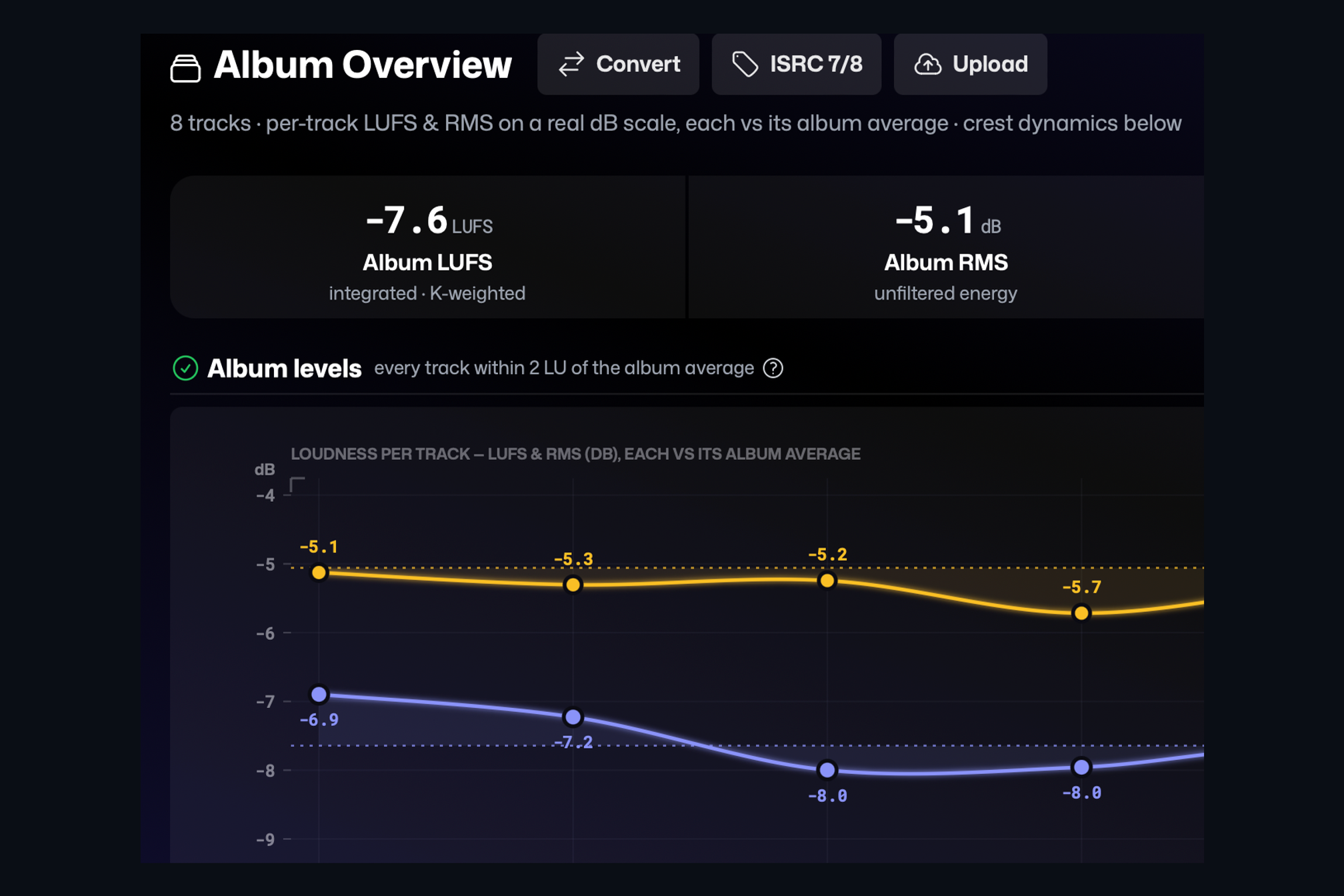
The Album Overview lays the whole release out on one page. At the top are the album-wide numbers: integrated loudness, average level, crest, and a consistency figure that says how tightly the tracks sit together. Below that, each track is drawn as a point on a loudness curve against the album average, with its dynamic range as a bar underneath. A song that sits well above or below the rest is obvious before you have listened to a note.
The consistency check
AMIE flags any track that is more than two loudness units away from the album average. It is a consistency check rather than a pass or fail, because sometimes the quiet interlude is supposed to be quiet. What it guarantees is that you made that decision on purpose.
Everything else, from the same page
The overview is also the place to finish a release. The ISRC button lets you copy the codes for the whole album, export them as a CSV, or embed them into the files. Convert changes the sample rate and bit depth of every track in one go, and Upload sends the finished set to Dropbox or Samply with a single share link.
Keep reading
This post is part of a series that walks through everything AMIE does. See the whole list on the AMIE product page, or see plans and pricing.
- Next in the series: Dolby Atmos masters, checked channel by channel
- Previous: Watch folder: analysis that runs itself